Edumento Kid
Curiosity becomes something they can do.
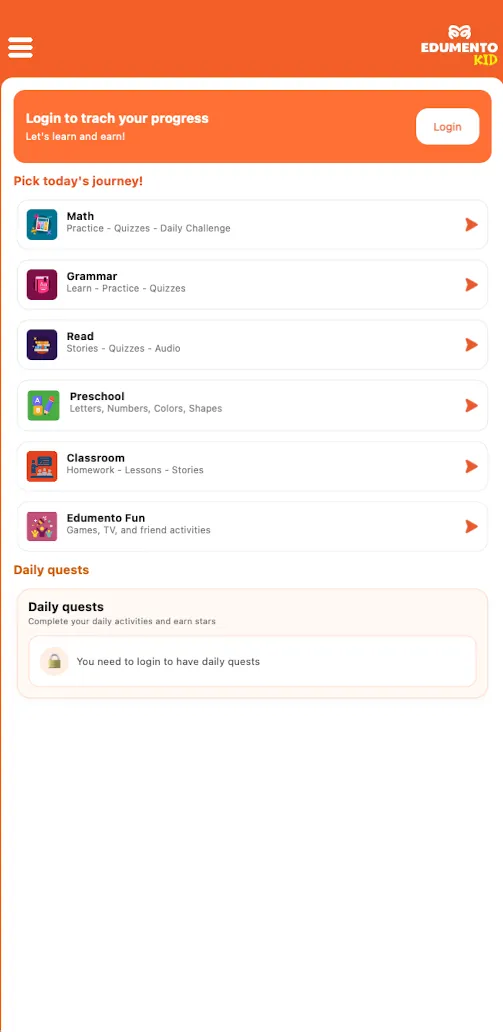
Explore subjects, read stories, solve questions and practise on paper. Mr. Mento helps children take the next step, with room to try, ask for help and try again.
Explore Edumento KidChildren. Parents. Teachers. Together.
Edumento helps children understand, practise and grow—with Mr. Mento, their parents and teachers, on screen and on paper.
Maths · Grammar · Reading · Science · Space · And more
Try it yourself. Then let's check together.

Our mission
Our mission is to make meaningful learning part of everyday life. Children need space to think and try. Parents need to understand how to help. Teachers need time and tools to teach. Edumento connects all three around the child's next small step.
Edumento Kid · Parent · Teacher
A place to learn for children, a clear view for parents, and a creative workspace for teachers.
Edumento Kid
Explore subjects, read stories, solve questions and practise on paper. Mr. Mento helps children take the next step, with room to try, ask for help and try again.
Explore Edumento KidEdumento Parent
A simple dashboard brings together progress, today's activity, topics needing support and Mr. Mento's suggested next step. Less searching through reports, more understanding your child.
Explore Edumento ParentEdumento Teacher
Create lessons, quizzes and classroom activities, prepare printable work, and connect what happens in class with practice at home. You review and shape the learning before sharing it.
Explore Edumento TeacherLearning on paper
Learning with Paper brings digital guidance to real work in a child's own handwriting. Choose a blank sheet or a printable worksheet, then work through it with Mr. Mento.
Voice guidance and step-by-step explanations help children compare their work, ask for support and reflect on what they have practised.
Edumento Parent
A simple dashboard brings together progress, today's activity, topics needing support and Mr. Mento's suggested next step. Less searching through reports, more understanding your child.
For parentsSee subject trends and compare correct-answer percentages when enough scored results are available. A score is one part of the picture, not the whole child.
See recent learning, completed work and available results. Open an activity for more detail when you need it.
Spot topics where your child asked for help or needs repeated practice. Missing results are clearly marked, rather than counted as zero.
Mr. Mento suggests a short next step from recorded practice. Prepare an activity, review it, and share it with your child.
Edumento Teacher
Create lessons, quizzes and classroom activities, prepare printable work, and connect what happens in class with practice at home. You review and shape the learning before sharing it.
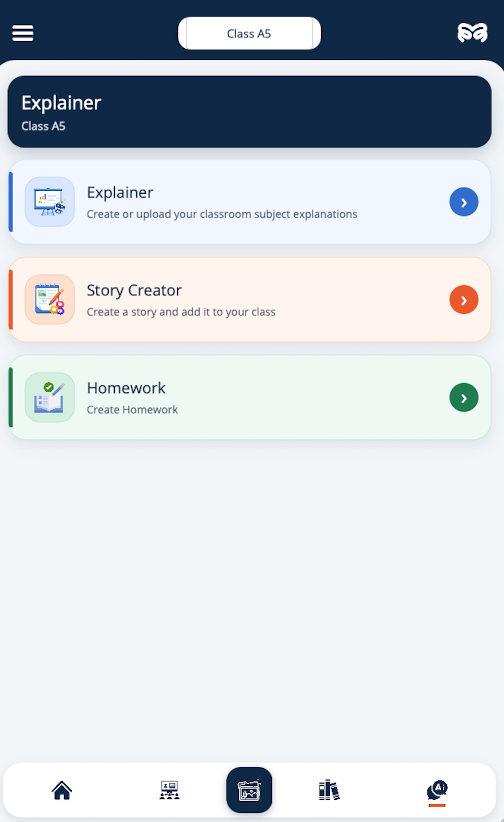
Start with a topic or learning goal and prepare a lesson, explanation, quiz or exam. Review the AI draft, adapt it to your class, then share it.
Choose and create quizzes, word games and classroom activities. Live Quiz adds a shared game: players join by link, enter a name, answer timed questions and see the scoreboard.
Organize classes, share assignments and follow available student results. Connect families with the work children are doing in class and at home.
AI helps prepare a starting point. Teachers review the content and keep the teaching decisions.
For teachersMr. Mento
Mr. Mento explains, encourages practice and suggests a useful next step from available learning activity. Parents and teachers stay part of the journey.
Choose a lesson, story or activity, or open work shared by a parent or teacher.
Answer on screen or take a pencil and work on paper. Asking for help is part of learning.
Check the explanation, try again where needed, and take the next small step.
Edumento Kid
Stories, playful activities, Edumento Pet, wooden learning toys and practical kits are different ways into the same idea: children learn by being curious, doing things and trying again.
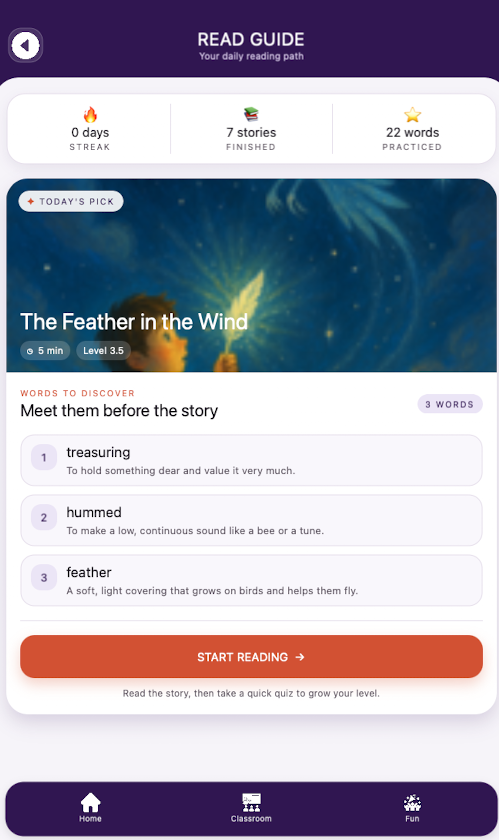
Discover stories, listen to narration, read aloud, record reading, practise vocabulary and check understanding. Children can also create a story around their own ideas.
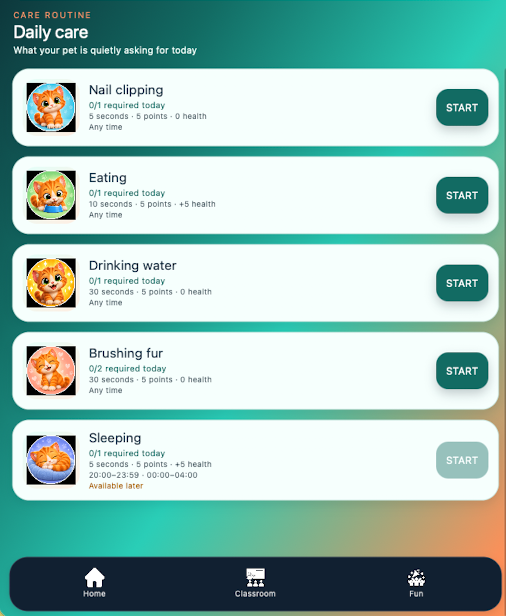
Learning games, creative activities and Edumento Pet bring variety to the day. Learning points and achievements celebrate participation and progress.
Edumento Book
Our vision for Edumento Book connects a physical storybook with audio narration and a digital quiz for the same story. Children keep the book in their hands, with digital support when they want to listen or check their understanding.
Start with the printed book. Explore the pictures and read at your own pace.
The QR code is the bridge from the printed story to its matching digital experience.
Hear that story read aloud, then return to the page and follow along.
Answer questions about the story you just read, then revisit the book to think through the answers.
One story connects the page, the narrator and the quiz. The book stays at the centre of the experience.
Preschool · Edumento Kit
Edumento Preschool brings the Edumento Kit, activity books and toys into one guided learning experience. Mr. Mento shows a shape or gives a task; children do the hands-on practice in their physical book, using real blocks and toys.
Books, blocks and learning toys give children something real to touch, move and try. The activity book is their place to practise.
Follow Mr. Mento’s model or instruction, then look for the blocks and pieces needed to make it.
Place and arrange the blocks on the book’s activity page to recreate the shape. Try, adjust and explore with your own hands.
Mr. Mento provides the guidance. The child does the building, playing and practice in the physical book.
Start with Edumento Kid, follow the journey as a parent, or bring a learning idea to your classroom with Edumento Teacher.